
|
This tutorial walks you through installing the TINI 1.0 firmware. The process is similar whether you are upgrading from a previous TINI version or installing TINI 1.0 for the first time on a newly purchased TINI SIMM. This tutorial assumes you have installed a JDK1.2 such as the one in JBuilder, and the Java Serial Port API, javax.comm. If not, here's a tutorial on that. |
| 1.0 TINI includes mostly minor changes and bug fixes from Beta 3.0. Release 1.0 was promised before JavaOne and it was released on time, Friday June 02, 2000. JavaOne 2000 is June 05-09. |
|
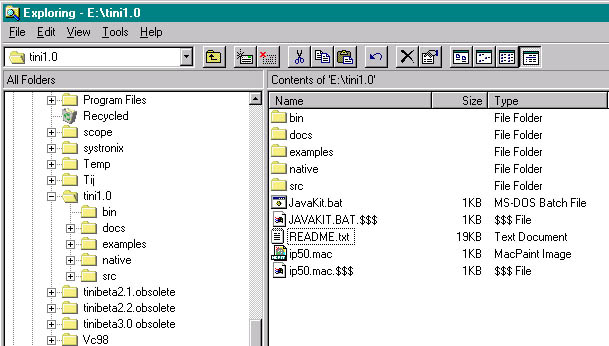
There are so many references to TINI files, and things get pretty snarled up if they reference an old version. Therefore, when changing to a new TINI firmare version I change the folder name of the old version so that any existing paths to its contents are broken. This gives me a clear "can't find file xxxx" error if I still have an outdated reference, instead of some other usually much more cryptic Java error. It's simple, and may save you a lot of frustration. |
|
Download the TINI 1.0 files from Dallas Semiconductor. Save the file (named tini1_0.tgz) to a temprary folder. I have an "incoming" folder where I temporarily store such things. Now expand the file using a utility such as WinZip. It may ask if you want to extract a .tar file within the archive. Yes, we do. From here the process is almost identical to installing Beta 3.0, so please follow the steps there. The only major difference is that 1.0 does not have a new boot loader, so if you installed the 0515 loader of Beta 3.0, you can keep that. All you need to load from 1.0 are the TINI JVM Firmwares tini.tbin and slush.tbin. Click here for a link to the steps for updating to loader 0515 in the Beta 3.0 tutorial. The 1.0 JavaKit loader seems to have some quirks. I could not get file->load to work consistently without clicking the JavaKit reset button, sometimes multiple times, before each load. I kept getting erroneous "Unable to reset board...DTR toggle" errors. Clicking the JavaKit RESET button and then immediately trying to load the file eventually works for me. Remember to change JavaKit.bat (if you use one as I do) to refer to the new tini1.0 files. |
|
Remember to change JavaKit.bat (if you use one as I do) to refer to the new tini1.0 files. If you use JBuilder, change the JBuilder35\bin\jdk.config file to refer to the 1.0 tini.jar. If you don't do this, TiniTools' Tini Convert will hang, waiting forever because it was not properly intialized when JBuilder started up. # +-----------------------------------------------------+ # Use the embedded JDK
provided with JBuilder Foundation # Add JPDA and the "tools"
JAR to the path since the JDK Close and restart JBuilder after this change, since JBuilder only reads this file on startup. You also need to change the "required libraries" configuration in JBuilder to point to the tiniclasses and tini jars: 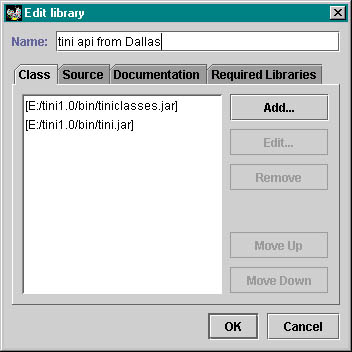 |
|
There's another gotcha which was also present in Beta 3.0 with TiniTools. The first time I tried a Tini Convert with 1.0, here's what happened: 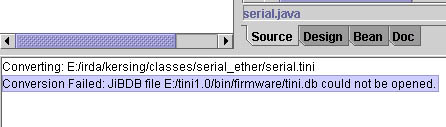 TiniTools currently is hard-coded to look for tini.db in that folder under tini1.0, so create it and copy tini.db into it. Then TINI convert should work. Be sure you copy tini.db, not move it, so that other tools which need it in the bin folder can still find it. |
|
|