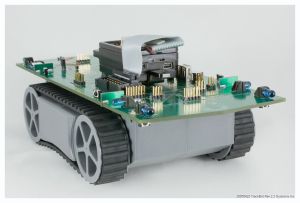
TracBot photo
TracBot photo
 
Application Notes and Example Code

What's the difference? Application notes have more documentation and supporting files such as screen captures and videos. Example code may have only a text readme and/or Java docs to guide you.

2008 Oct 09: Updates to working code, videos, etc


Upgrading Sun SPOT
2008 June - the Sun SPOT SDK Blue 080609 release fixes a number of serial I/O and other eDemo board issues (a complete list is included in the release docs). We recommend everyone upgrade to this release. Unless you have a specific reason, we recommend that you steer clear of the pre-release beta versions since they have not been fully tested. Blue 080609 has been through some substantial testing, and it is the release we currently use.

Old Systronix SPOT blog archive

Simple blog of our first SunSPOT impressions and use

Start here with TrackBot Application Code for basic IR sensor use and simple behaviors

Greenfoot Simulator
Greenfoot Icon

Greenfoot simulator support for TrackBot including a Quick Start guide and quite a lot of documentation to help you get started. This java.net project provides a pretty accurate 2-D simulation of TrackBot in a world of obstacles and other TrackBots. You can easily customize the world. Mostly the work of Shawn Silverman to whom we owe a huge thanks! Click on the green foot or here https://trackbot-greenfoot.dev.java.net/

Sensor Evaluation and Test
get it here

This java.net project is part of the parent trackbotcode project. Look for the TrackBotSensorEval sub-project link. This is a PC-based application which connects to TrackBot through a DCE serial adapter and enables testing and characterization of all eight IR sensors on the TrackBot platform. Includes a screen-based text/graphical display of sensor response in all three sensitivity settings. Command line parameters include which pair of the eight sensors to test at a time (e.g., forward, aft, port, starboard, forward cliff or aft cliff). It's not beautiful but it's simple and it works.

Simple sensor Monitor, plus
Avoider and Wanderer modes

Source code
Videos

This app note shows how to load, execute, and interpret results from a multi-mode program which uses Sun SPOT as the application brain for TrackBot. SPOT's eight RGB LEDs are put to great use to display TrackBot sensor status. Use the SPOT buttons to select three operating modes:
  1. Monitor - TrackBot doesn't move, it just displays the state of all IR sensors (including optional Cliff sensors, if installed) on the Sun SPOT RGB LEDs. Also displays the output of the TrackBot infrared ambient light sensor. These displays are also active in the Avoider and Wanderer modes.
  2. Avoider - TrackBot trys to stay away from all obstacles detected by fore and aft sensors. If fore and aft directions are blocked, TrackBot side sensors are checked for a possible escape route, and TrackBot will turn as needed. If no fore and aft obstacles are detected, TrackBot sits quietly.
  3. Wanderer - TrackBot wanders around forever, trying to avoid obstacles by using IR sensors in a manner similar to Avoider.

Make things more interesting by putting a mixture of Avoider and Wanderer TrackBots in the same closed space.

These same three modes are also supported in the Greenfoot simulator!

Optimizing Sensor Ranges

Coming Soon!

The multi-function IR sensors built in to TrackBot have some unconventional capabilities and also some unconventional characteristics (relative to conventional Sharp IR rangefinders and sonar). TrackBot IR sensors adapt to the level if (infrared) ambient light by automatically decreasing sensor gain as ambient light increases, to avoid sensor saturation. This feature is built into the IR sensor modules and can't be changed. It also means that to get the most out of the TrackBot IR sensors, you will want to monitor the ambient IR level (TrackBot provides a sensor for that purpose) and compensate by adjusting the "digital gain" of the IR emitters. This isn't very obvious or intuitive, but this application note explains it all. When you've read the App Note you'll be able to dynamically adjust the IR sensor range to suit your environment and to get simple range data (close/medium/far) from the sensors.

Using Sun SPOT accelerometer
as a bump sensor

Source code
Video

TrackBot doesn't have mechanical contact sensors such as whiskers or a bump skirt. There are cases in which the IR sensors might be fooled, and they do have some small blind spots. Not to worry, you can use the SPOT accelerometer to detect obstacle collisions. Here's how.

Java.net Robotics Projects
Root project for first simple behaviors, support for obstacle sensors, etc.
robotics projects root page at Java.net
There are a number of TrackBot-related projects at Java.net, so rather than duplicate all the links here, there is a link to the root of the robotics community projects

JavaOne 2007 Hands on Lab 7230
JavaOne Hands on Lab 7230
Download the Code and Instructions
This is the hands on lab where 100 TrackBots and SunSPOT kits were all in use at the same time. This may be the first time such a mass public robotic class has been given. You may download the Hands on Lab materials and code from http://developers.sun.com/learning/javaoneonline/j1lab.jsp?lab=LAB-7230&yr=2007&track=4

JStamp  JStik  JCX JSimm/SimmStick SunSPOT
Systronix® 939 Edison Street , Salt Lake City, Utah, USA 84111
Contact us

Java and all Java-based marks are trademarks or registered trademarks of Sun Microsystems, Inc. in the U.S. and other countries.
TrackBot, Robot Area Network, Digital Reflexes, JStamp, TStik, JCX and JSimm are trademarks of Systronix, Inc.